Interior Decorator
The Interior Decorator is the tool for arranging a house. Every Architect sells it for 10,000 gold. Since October 2026 it does far more than turn and raise a piece: it nudges lock-downs one tile in any direction, locks down, releases and secures from the same window, brings the last piece you touched to your feet, and surveys the house for anything that is not locked down.
Using it ↑ top
Double-click the decorator while it is in your backpack and you stand inside a house you own or co-own. Its control panel opens. Pick a mode and a targeting cursor appears; the cursor stays armed after every target, so you can turn ten chairs in a row without reopening anything. Escape clears the mode and keeps the window; closing the window cancels the cursor. The tool's tooltip always tells you the active mode.
The tool refuses to work for 30 seconds after you were in a fight, and it never touches anything outside the house.
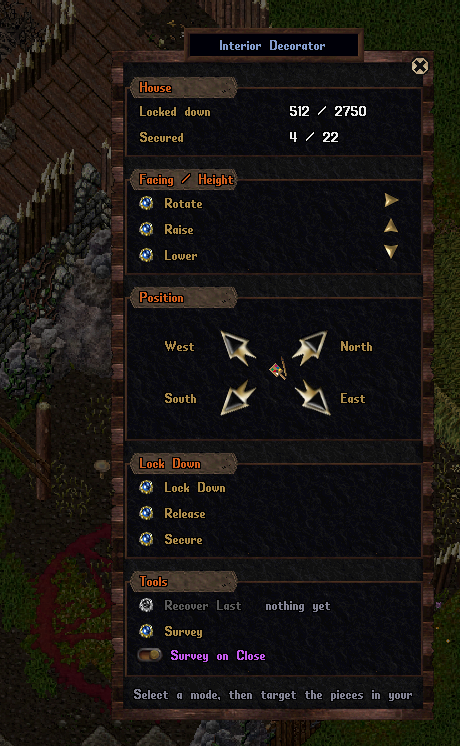
The decorator's control panel. The House box at the top shows how many lock-downs and secures the house is using out of its allowance.
What it does ↑ top
| Section | Mode | Effect on the next target |
|---|---|---|
| House | No mode: shows the house's locked-down and secured counts against its limits. | |
| Facing / Height | Rotate | Turns the piece to its next facing. An addon turns as a whole. |
| Raise | Lifts the piece one step, up to 15 above the floor. | |
| Lower | Lowers it one step, down to the floor. | |
| Position | North, East, South, West | Nudges the piece one tile that way. |
| Lock Down | Lock Down | Locks the item down where it stands. |
| Release | Releases a lock-down or a secure container. | |
| Secure | Secures a container. Owner only; a non-container is locked down instead. | |
| Tools | Recover Last | Moves the last locked-down or secured item you targeted to your feet, after a confirmation. |
| Survey | Marks every item in the house that is neither locked down nor secured. | |
| Survey on Close | Runs the survey every time you close the window. On by default. |
Rules ↑ top
- Only lock-downs, secure containers and addons can be moved or rotated. A loose item has to be locked down first, and Lock Down mode does that without leaving the tool.
- A locked-down item heavier than 100 stones, contents included, stays where it is.
- An addon moves and turns as one piece: target any part of it. Seasonal addons such as the Flaming Scarecrow are turned this way.
- A nudge has to stay inside the house. It cannot push a piece into a wall or onto someone, and the piece lands on the first free height above the floor at its new spot.
- A vendor rental contract can only be locked down or released.
Survey ↑ top
Survey walks the whole house and marks every loose item, visible to you alone: a sparkle and an [Insecure] tag over each one, red for containers and yellow for other items, followed by a summary and a list in your journal with every item's position. A clean house plays a success sound. With Survey on Close on, the survey runs every time you close the decorator, so nothing is left lying around after a redecoration.
Related pages ↑ top
- Housing Overview: lock-downs, secures and who may do what in a house
- House Storage: the storage furniture that has to be secured to work